Analyzing Trends Across Multiple Tax Years
Last updated: September 30, 2026
Context
For ongoing client relationships, seeing how a client's tax picture changes over time is often more valuable than any single year in isolation. Worthy makes this easy: you can upload multiple years of tax returns for a single client and analyze trends across them.
Once multiple years are in place, you can compare them side by side in the Trends view, and Worthy's chat will look across all uploaded years when you chart figures or run scenarios. Worthy currently supports tax forms going back to 2023.
How to Upload Additional Tax Years
Open the client profile.
Click the purple "Upload" button to add more forms to that client's account.

Upload the additional year's tax return.
You can repeat this for each year you'd like to include, going back to 2023.
Switching Between Years and the Trends View
Next to the Upload button, you'll see a selector showing "Single Year | 2025" (or whichever year is currently displayed).
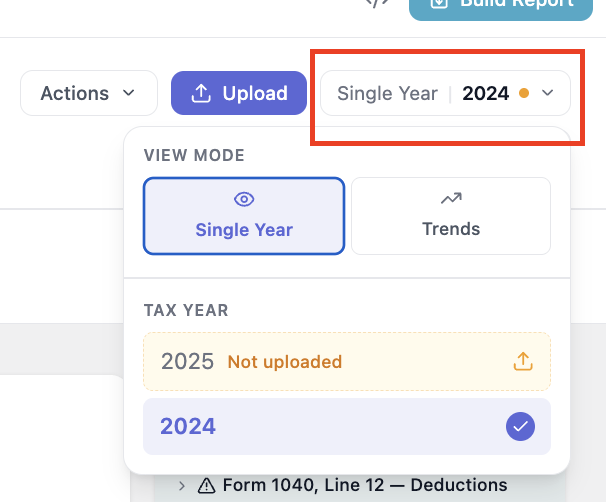
Click it to change which tax year appears on the overview page, or choose "Trends" to see the multi-year comparison across all uploaded returns.
Working with Multiple Years in Chat
Once more than one year has been uploaded, Worthy's chat automatically takes all uploaded years into account. You can ask it to chart figures over time or run scenarios, and it will analyze across every year on file — giving you a richer, longer-term view of the client's situation.
Important Notes
Worthy supports tax forms dating back to 2023.
The Trends view provides a year-over-year comparison once multiple years are uploaded.