What's Up with Worthy — June 15, 2026
Last updated: September 30, 2026
Welcome to our monthly roundup of new features and product updates. From a smarter underlying AI model to new client privacy controls, here's what we've shipped since our last update.
We're constantly working to make Worthy smarter, more accurate, and more flexible — and getting input from hundreds of advisors in the process. With that said, every advisor faces unique opportunities and challenges. If there's a feature you'd like to see, or something we could improve, please let us know: hello@withworthy.com.
Upgraded to our AI Model
We've switched to the latest AI model that supports enterprise security. Updating to the latest model will yield faster responses and improved accuracy on complex multi-form scenarios. Model upgrades like this are a normal part of how AI products improve, and this change should be a meaningful step forward.
Keep sensitive clients private
You can now mark any client as private in Worthy. When a client is private, they're visible only to you — no one else can see that client, including your Client Service Team members and Firm Admin accounts. Your own access to the client's data and insights is unchanged.
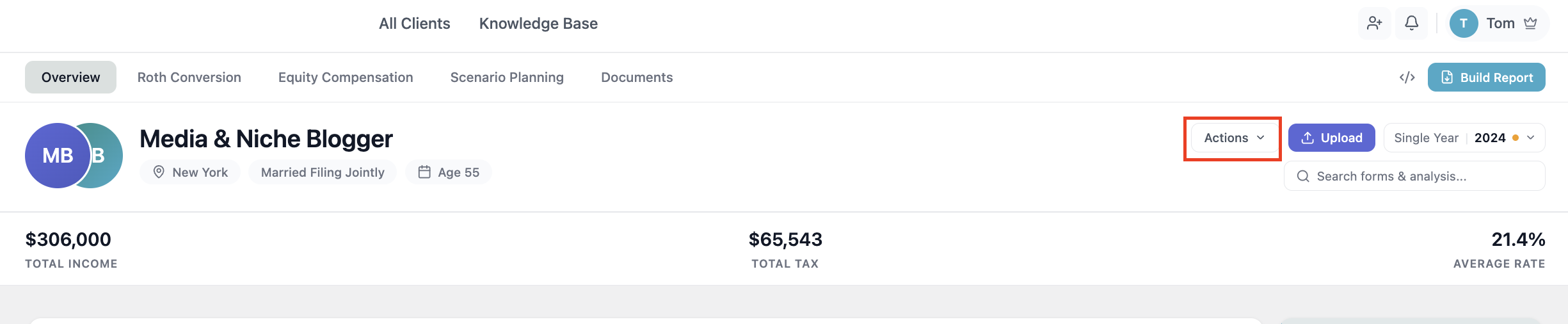
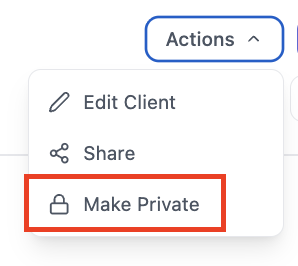
Marking a client private is simple: open the client, click "Actions" in the upper right corner, and select "Make Private." While a client is private, the "Share" action is disabled. You can reverse this anytime by clicking "Actions" and then "Make Visible."
Feature Spotlight: Share clients with your colleagues
A quick reminder of one of our most useful collaboration features. With Worthy, you can share any of your clients with any other advisor in your company using our share feature. When you share a client with a colleague, you both gain the ability to ask Worthy questions about that client, run tools like Roth Conversions, understand Equity Compensation documents, and build reports.
To share a client, just click the "Actions" button, hit "Share," and find your colleague from the list. Make sure to give them "Edit" permissions if you want them to be able to take actions — otherwise they'll have view-only access.

We're grateful to have the opportunity to build the best and smartest tax planning platform for professionals like you. The best way to see all this is to log in and use Worthy. There's no setup, so you'll be up and running in minutes.
If you need inspiration, check out recommended Worthy best practices, or some of the top queries for improving tax planning.
If you have questions or want to learn more about a new feature, please reach out. We'd be excited to show you what's possible: hello@withworthy.com.